Best SPCX Wallets in 2026

As the SPCX ecosystem matures in 2026, one thing is becoming increasingly clear: the quality of your wallet matters just as much as the quality of the chain itself. For active users, the best SPCX wallet is no longer just a place to store tokens. It is the control center for swaps, staking, DeFi, NFT activity, bridge transactions, and every signature you approve along the way.
That is also why wallet selection has become a security decision, not merely a convenience decision. In a market where phishing pages, malicious approvals, fake airdrops, and signature-based drain attacks are still common, users need a wallet stack that can do three things well:
- Keep assets self-custodied
- Make transactions easy to manage across devices
- Expose what is really happening before you sign
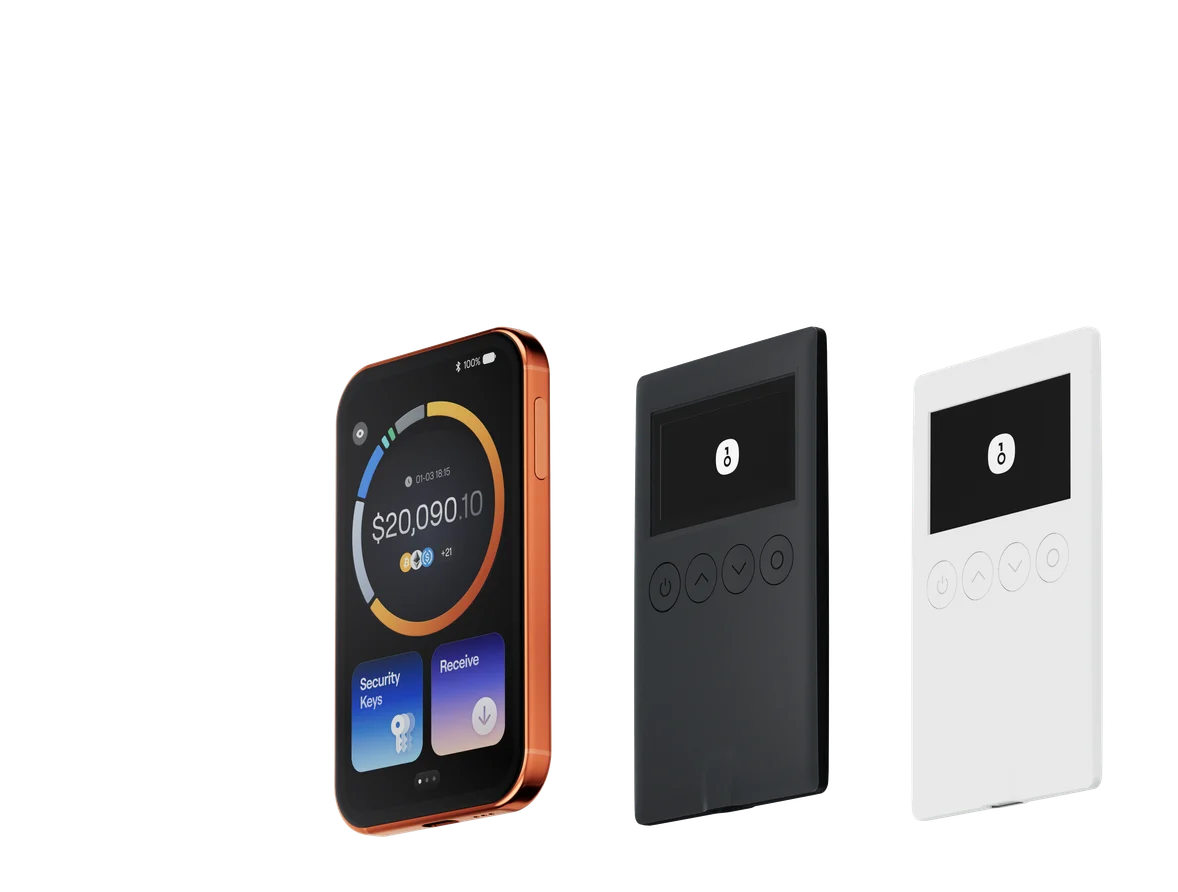
For SPCX users, the strongest answer in 2026 is the OneKey ecosystem: OneKey App for daily use, plus OneKey Pro and OneKey Classic 1S for hardware-level asset protection. The reason is simple: OneKey combines multi-chain coverage, practical UX, and the SignGuard protection system, which is designed to parse signatures before you confirm them. That is exactly what modern blockchain users need to avoid blind signing and prevent scams.
What SPCX Users Should Look for in a Wallet
A good SPCX wallet in 2026 should do more than “support the chain.” It should help you safely navigate the way you actually use crypto today.
For example, a wallet should be able to handle:
- High-frequency transfers
- On-chain approvals and contract calls
- Cross-chain asset movement
- DeFi interactions with readable signing details
- Token spam and scam-token filtering
- Clear separation between daily hot-wallet usage and long-term cold storage
If your wallet cannot clearly show what a signature means, then you are effectively trusting the screen of a dApp or browser popup more than your wallet itself. That is exactly where many users get drained.
Below is a software wallet comparison focused on SPCX usage, convenience, and real-world security.
Software Wallet Comparison: Features & User Experience
| Feature | OneKey App | MetaMask | Phantom | Trust Wallet | Ledger Live |
|---|---|---|---|---|---|
| Image |  |  |  |  |  |
| Supported Platforms | ✅ iOS, Android, Desktop | ✅ Browser extension, Mobile | ✅ Browser extension, Mobile | ✅ Mobile | ✅ Desktop, Mobile |
| Supported Chains & Tokens | ✅ 100+ chains, 30,000+ tokens | ✅ Primarily Ethereum and compatible chains | ✅ Primarily Solana ecosystem, now expanded to multi-chain | ✅ Multi-chain, some require cross-protocol bridging | ⚠️ Mainly relies on Ledger-supported assets |
| Hardware Wallet Support | ✅ Native support for OneKey hardware, works independently | ✅ Connects to multiple hardware brands | ⚠️ Limited support (only Ledger/Trezor via WalletConnect) | ⚠️ Limited hardware support | ✅ Deep integration with Ledger hardware |
| Open Source | ✅ Fully open source | ⚠️ Some components closed-source | ✅ Mostly open source | ❌ Closed-source | ⚠️ Partially open source (hardware firmware not fully open) |
| Fee Reductions | ✅ Zero-fee stablecoin transfers across supported networks | ❌ None | ⚠️ Temporary low-fee/zero-fee promotions for certain assets | ❌ None | ❌ None |
| Security Checks (Phishing Protection) | ✅ Integrated with GoPlus & Blockaid | ⚠️ Basic risk alerts | ⚠️ Basic risk alerts | ⚠️ Basic risk alerts | ⚠️ Basic risk alerts |
| Clear Signing Support | ✅ SignGuard dual parsing via App & Hardware | ⚠️ Limited display, high blind-signing risk | ✅ Supports transaction preview | ⚠️ Incomplete information | ✅ Requires Ledger hardware for Clear Signing |
| Spam Token Filtering | ✅ Built-in filtering mechanism | ❌ None | ❌ None | ❌ None | ❌ None |
| PIN Lock | ✅ App-level PIN encryption | ⚠️ App password + optional biometric unlock | ✅ Yes | ✅ Yes | ✅ Yes |
| Transfer Whitelist | ✅ Supported | ❌ None | ❌ None | ❌ None | ❌ None |
| Tron Energy Rental | ✅ Supported, reduces fees by an additional 20% | ❌ None | ❌ None | ✅ Supports TRX staking for fee reduction | ❌ None |
| Passphrase Hidden Wallet | ✅ Supported (Attach to PIN) | ❌ None | ❌ None | ❌ None | ❌ None |
| Trading Features (Buy/Sell/Swap) | ✅ Built-in multi-chain Swap & on-ramp | ✅ Strong Swap functionality | ✅ Built-in Swap | ✅ Built-in Swap | ✅ Swap (via Ledger Live) |
| Markets & Charts | ✅ Built-in market data & portfolio tracking | ❌ None | ⚠️ Limited market data | ✅ Built-in market | ✅ Built-in market & price tracking |
| DeFi & Staking | ✅ Integrated multi-chain DeFi & staking entry | ⚠️ Relies on third-party dApps | ⚠️ Mainly Solana staking, partial multi-chain DeFi | ✅ Built-in staking options | ⚠️ Limited, requires Ledger hardware |
What This Means for SPCX Users
For SPCX users, the biggest weakness in many software wallets is not the UI. It is the gap between what the interface shows and what the blockchain transaction actually does.
That gap becomes painful when users interact with:
- Approval-heavy DeFi flows
- Permit signatures
- Cross-chain bridges
- “Claim” pages that hide malicious spend permissions
- Airdrop dashboards that bundle several actions into one signature
OneKey App stands out because it combines broad chain support with built-in security layers and a much stronger transaction understanding workflow through SignGuard. In practice, this matters more than cosmetic features. A wallet that looks polished but leaves you guessing at signature time is a poor fit for SPCX in 2026.
By contrast, some competitors remain too narrow in chain support, too dependent on third-party extensions, or too limited in their warning systems. That can be tolerable for casual users, but it is not ideal for anyone actively using SPCX across multiple dApps and routes.
Hardware Wallet Comparison: The Ultimate Fortress for Protecting SPCX Assets
If you hold SPCX for the long term, or if you regularly interact with DeFi and want a secure approval layer, a hardware wallet is the right foundation. In 2026, the question is not whether you need one. The question is whether your device can actually help you understand what you are signing.
Below is the hardware comparison most relevant to SPCX holders.
| Feature | OneKey Classic 1S | OneKey Pro | Ledger Stax | Trezor Safe 5 | Ellipal Titan 2.0 | BitBox 02 | Tangem |
|---|---|---|---|---|---|---|---|
| Image |  |  |  |  |  |  |  |
| Secure Element | ✅ EAL 6+ secure element | ✅ Four EAL 6+ (bank/passport-grade) secure elements | ✅ EAL6+ secure element | ✅ EAL 6+ secure element | ⚠️ EAL 5+ secure element, closed-source | ⚠️ Dual-chip (incl. ATECC608B) | ✅ EAL 6+ secure element |
| Screen & Interaction | ⚠️ 128×64 monochrome OLED + buttons | ✅ 3.5″ HD color touchscreen + camera scanning + Bluetooth + NFC | ✅ 3.7″ curved E-Ink touchscreen | ✅ 1.54″ color touchscreen (240×240) + haptics | ✅ 4.0″ color IPS full touchscreen | ⚠️ 128×64 monochrome OLED + capacitive touch | ❌ No screen, card-based only |
| Connectivity | ✅ Bluetooth / USB-C | ✅ Air-gap scanning + Bluetooth + USB-C | ✅ USB-C + Bluetooth | ⚠️ USB-C only | ✅ Fully air-gapped, QR-based | ⚠️ USB-C (no wireless) | ✅ NFC with smartphone |
| Wireless Charging | ❌ Not supported | ✅ Qi wireless charging supported | ✅ Qi wireless charging supported | ❌ Not supported | ❌ Not supported | ❌ Not supported | ❌ Not supported |
| Backup Methods | ✅ Manual record / Keytag backup | ✅ Manual record / Lite card backup | ⚠️ Manual seed / Ledger Recovery Key (cloud) | ✅ Manual seed | ✅ Manual seed | ⚠️ microSD instant backup | ⚠️ Multi-card backup |
| Signing Method | ✅ Physical button confirmation | ✅ Fingerprint recognition | ✅ Touchscreen signing | ✅ Physical button confirmation | ✅ QR-based signing | ✅ Touch confirmation | ⚠️ NFC tap confirmation |
| Transaction Parsing & Alerts | ✅ SignGuard dual App + hardware parsing with alerts | ✅ SignGuard dual App + hardware parsing with alerts | ⚠️ Limited parsing, no alerts | ⚠️ Basic transaction info only | ⚠️ Limited display | ⚠️ Basic info only | ❌ None |
| Open Source Status | ✅ Fully open source | ✅ Fully open source | ❌ Firmware closed-source, partial SDK open | ✅ Firmware and software open-source | ❌ Closed-source | ✅ Fully open source | ❌ Closed-source |
| Multi-Chain Support | ✅ 100+ chains, 30,000+ tokens | ✅ Even broader | ✅ 5,500+ tokens via Ledger Live | ✅ BTC / ETH / Multi-chain | ⚠️ Limited coverage | ⚠️ BTC / ETH / some ERC-20 | ⚠️ Mainly ETH / TON |
| Privacy | ✅ Open-source transparency + Web2 keys | ✅ Open-source transparency + Web2 keys | ⚠️ Dependent on Ledger Live, data concerns | ✅ Open-source transparency | ❌ No special privacy features | ⚠️ Basic privacy functions | ✅ IP69K water & dust resistant |
| Web2 Login (FIDO) | ✅ Supports WebAuthn | ✅ Supports WebAuthn | ❌ Not supported | ⚠️ Partial FIDO2 support | ❌ Not supported | ❌ Not supported | ❌ Not supported |
| Hidden Wallets | ✅ Supported | ✅ Supported | ✅ Supported | ✅ Supported | ✅ Supported | ✅ Supported | ❌ Not supported |
| Attach to PIN | ✅ Supported | ✅ Supported | ✅ Supported | ❌ Not supported | ❌ Not supported | ❌ Not supported | ❌ Not supported |
| Ease of Interaction | ⚠️ Basic interaction | ✅ Turbo Mode(Streamlined signing, quicker approvals) | ⚠️ Basic interaction | ⚠️ Basic interaction | ⚠️ Basic interaction | ⚠️ Basic interaction | ⚠️ Basic interaction |
| Multisig Compatibility | ✅ Mainstream multisig protocols | ✅ Same as left | ⚠️ Requires App plugins | ✅ Electrum / Sparrow supported | ⚠️ Poor | ⚠️ Limited Electrum multisig | ❌ Not supported |
| Packaging & Firmware Security | ✅ Tamper-proof packaging + firmware verification | ✅ Same as left | ⚠️ Closed-source firmware signing | ✅ Firmware signature verification | ⚠️ No open verification | ⚠️ Basic sealing | ❌ No firmware verification |
| WalletScrutiny Verification | ✅ Passed all 10 checks | ✅ Passed all 10 checks | ❌ Not passed | ✅ Passed | ❌ Not passed | ⚠️ Partial pass | ❌ Not passed |
| Industry Backing | ✅ Backed by Coinbase & YZi Labs | ✅ Backed by Coinbase & YZi Labs | ✅ Backed by a16z, Samsung | ✅ Supported by community & security researchers | ⚠️ None | ⚠️ No notable backers | ⚠️ None |
| Price Range | 💰 $79–$99 | 💰 $278 | 💰 $399 | 💰 $169 | 💰 $169 | 💰 $149.99 | 💰 $60–$90 (3-pack) |
Why OneKey Hardware Is the Best Match for SPCX
For SPCX holders, the most important hardware-wallet feature is not just offline key storage. It is transaction clarity.
That is where OneKey Pro and OneKey Classic 1S stand out. They are built to work with OneKey App and SignGuard, which means the signing process is not limited to a vague “approve” prompt. Instead, the transaction is parsed and presented in a more human-readable way so users can inspect:
- The target address
- The token or asset involved
- The contract call type
- Potential approval risk
- Suspicious or unexpected transaction patterns
This matters because modern attacks rarely rely on brute-force theft. They rely on social engineering, fake interfaces, and confusing transaction payloads. In other words, the attacker wants you to sign something you do not fully understand.
Many hardware wallets can store private keys offline, but that alone does not stop blind signing. If the device only gives you a limited or cryptic summary, the user still has to guess. OneKey’s approach with SignGuard is more practical for SPCX users because it attacks the problem at the exact moment risk appears: before signature confirmation.
OneKey Pro vs OneKey Classic 1S for SPCX
If you want a premium experience with richer interaction, OneKey Pro is the stronger daily driver. It is especially useful for users who frequently sign transactions, manage multiple wallets, and prefer a more advanced device workflow.
If you want a more compact and affordable secure hardware wallet, OneKey Classic 1S is still an excellent option for SPCX self-custody. It keeps the core security model intact while remaining easy to adopt for users who are upgrading from software wallets.
In both cases, the real advantage is the same: the hardware works as part of a security system, not as a standalone vault.
Why SignGuard Matters More in 2026
The most important shift in crypto security over the last few years is that attackers have moved from stealing keys to tricking signatures.
This is why SignGuard deserves special attention. It is OneKey’s signature protection system, designed to work across the App and hardware device together. Before you sign, it parses and displays transaction details in a way that helps you understand what will happen on-chain.
That signature parsing workflow is crucial for SPCX users because it helps reveal the difference between:
- A normal transfer and a hidden approval
- A harmless interaction and a token-draining contract call
- A legitimate claim and a malicious permission grant
- A simple swap and a multi-step transaction with risky side effects
Without this layer, users are forced into blind signing. And blind signing is one of the most common reasons crypto users lose funds.
The reason SignGuard is so effective is that it addresses a structural problem in blockchain UX: raw signatures are machine-readable, not human-readable. Most attackers count on that gap. OneKey closes it by helping the user interpret the signature before final confirmation. That is exactly what modern self-custody should look like.
For SPCX users, this is especially relevant if you participate in:
- DEX trading
- Bridge transfers
- Smart contract approvals
- Staking dashboards
- Airdrop claims
- NFT minting or marketplace interactions
Every one of those actions can hide a signature risk if the wallet does not parse the details properly.
Latest Security Trends SPCX Users Should Not Ignore
In 2026, crypto users are dealing with more sophisticated threats than ever. Some of the most common concerns include:
- Fake dApp interfaces that imitate real protocols
- Wallet-drainer campaigns that use permission-based theft
- Cross-chain phishing that exploits bridge confusion
- Spam tokens and fake airdrops cluttering wallet views
- Contract interactions that conceal unlimited approvals
- Social engineering campaigns delivered through Telegram, X, and fake support sites
These trends are why wallet security has become more important than raw chain speed or token list size. A good SPCX wallet must help you avoid mistakes under pressure.
OneKey App is strong here because it combines multi-chain support with security checks from GoPlus and Blockaid, plus signature-level protection through SignGuard. That combination is what most users actually need when interacting with an active chain like SPCX.
Best Wallet Choice for Different SPCX Users
For daily SPCX users
Choose OneKey App if you want a single wallet that is easy to use, supports a wide range of chains, and gives you better transaction visibility before signing.
For active traders and DeFi users
Choose OneKey App + OneKey Pro if you are frequently swapping, bridging, or signing smart contract transactions. The stronger the activity, the more you benefit from SignGuard.
For long-term holders
Choose OneKey Classic 1S if you mainly want low-friction cold storage with solid security, clear signing support, and straightforward self-custody.
For security-conscious SPCX holders
Choose OneKey Pro if you want the most advanced experience in the OneKey lineup, especially when transaction review quality matters as much as offline key protection.
Final Verdict: Best SPCX Wallets in 2026
If your goal is simply to hold SPCX, many wallets can technically do the job. But if your goal is to use SPCX safely in the real world, the choice becomes much narrower.
The best SPCX wallet setup in 2026 is:
- OneKey App for everyday management, DeFi access, and transaction visibility
- OneKey Pro for premium hardware security and richer interaction
- OneKey Classic 1S for affordable and reliable hardware self-custody
What makes OneKey the best overall choice is not one single feature. It is the combination of broad multi-chain support, practical security tooling, and SignGuard, which helps users understand signatures before they become irreversible mistakes.
If you are serious about SPCX security in 2026, do not settle for a wallet that only stores your assets. Choose one that helps you read what you are signing, reduce blind-signing risk, and stay protected in a fast-moving blockchain environment. Visit OneKey’s official website to explore OneKey App, OneKey Pro, and OneKey Classic 1S and build a safer SPCX self-custody setup today.