Why OneKey + 1inch is the Best Partner for Crypto Trading?

In the world of cryptocurrency, every transaction comes with invisible costs.
For users who frequently Swap tokens, the biggest enemy isn't just Gas fees, but also Slippage and exchange rate differences. Have you ever traded on a single decentralized exchange (DEX) only to find out later that another platform offered a better rate? Or, to find the best price, you had to switch back and forth between multiple platforms—a process that is both tedious and prone to operational errors that put your assets at risk.
How can you capture the market's "optimal price" like a top trader while ensuring asset security?
The answer lies in the powerful union of a "Top-Tier Aggregator" and an "All-in-One Wallet." Let’s see how this combination makes your crypto asset trading both simple and cost-effective.
1inch: Not an Exchange, But the Crypto World's "Price Comparison Tool"
1inch is a DEX Aggregator.
It does not hold Liquidity Pools itself. Its operating model is more like a super search engine: when you want to trade, 1inch scans even hundreds of liquidity sources across the entire network behind the scenes.
Core Black Tech: Pathfinder Algorithm
1inch is able to offer highly competitive rates thanks to its famous Pathfinder algorithm.
When you input a trade request, Pathfinder instantly calculates the optimal path. It not only finds prices within a single exchange but can also split an order across multiple different decentralized exchanges (DEXs) to execute simultaneously.
- Market Optimal Solution: Through this smart routing, users usually get a final exchange rate that is more cost-effective and has lower slippage than trading directly on a single DEX.
- Cost Savings: Even a rate advantage of one-tenth of a percent can accumulate into significant gains in large or high-frequency trades.
OneKey: The Secure and Convenient Gateway to Trading
Having the best exchange rate tool is not enough; you also need a secure gate to execute operations. This is the role of OneKey.
OneKey is not only famous for its top-tier open-source hardware wallets, but its software ecosystem—OneKey App—is also a powerful self-custody wallet. Whether you use it with a hardware device or not, the OneKey App provides you with an ultimate asset management experience.
The Synergy of Integration
The OneKey team understands users' pursuit of "good prices," so we have deeply integrated the 1inch protocol within the App. This integration brings two major advantages:
- Native Experience, No Hassle: You don't need to leave the OneKey App or open a browser to type in a URL. You can enjoy aggregated trading services directly in the wallet's "Swap" interface.
- What You See Is What You Get Transparency: After entering the swap amount in the OneKey App, the system automatically compares and displays the best quote provided by the 1inch router. What you see is the best result after a network-wide price comparison.
Practical Tutorial: How to Achieve Secure and Silky-Smooth Trading
Whether you are using the OneKey App hot wallet or pairing it with a OneKey hardware wallet, getting started is easy. The following steps correspond to the illustrated operations:
Scenario A: OneKey App Users (The Most Convenient Mobile Experience)
This is the most efficient way for daily trading; you only need the OneKey App on your phone or computer to complete it.
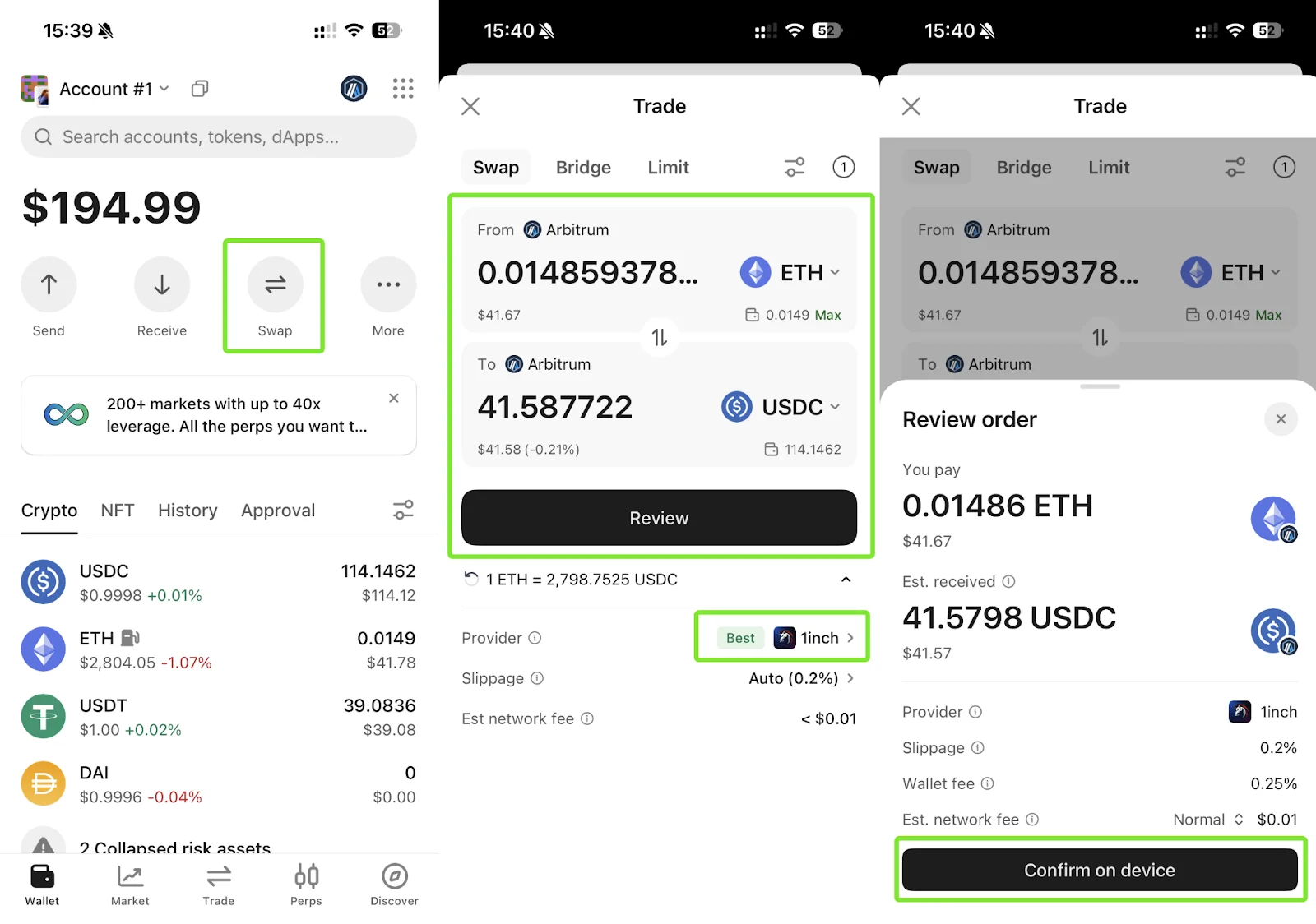
Step 1: Enter the Swap Interface Open the OneKey App and click the "Swap" button in the function bar on the asset home page to enter the trading page.
Step 2: Confirm 1inch Quote Enter the amount of assets you want to swap (e.g., ETH). After the system calculates the exchange rate, please pay attention to the "Provider" section at the bottom of the interface. Here it will clearly display "Best 1inch", indicating that OneKey has automatically matched you with the market's best quote based on 1inch routing. After confirming everything is correct, click the "Review" button at the bottom.
Step 3: One-Click Sign and Send On the "Review Order" page, verify the slippage and fees one last time.
- If you are using the App hot wallet, simply click confirm at the bottom to quickly sign and broadcast the transaction on-chain.
- If you have connected a hardware wallet, the interface will display "Confirm on device". At this point, simply press the physical button on the hardware, which is both secure and convenient.
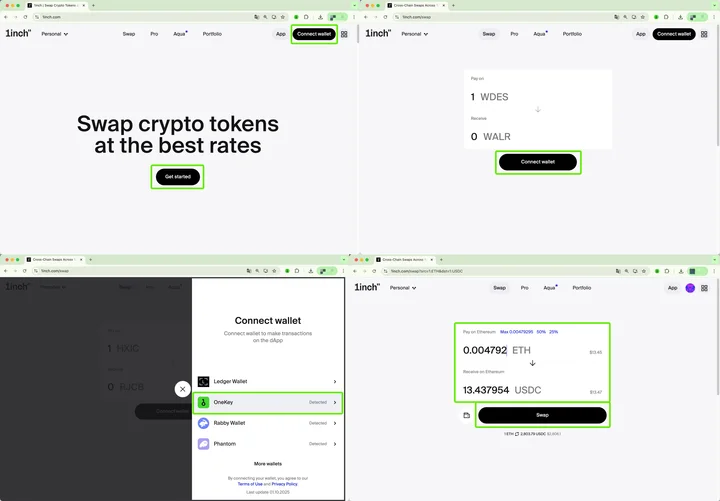
Scenario B: Connecting to 1inch DApp (Advanced/Web Users)
If you are accustomed to the 1inch official website or need to use specific functions of the 1inch site, OneKey supports it just as perfectly.
Step 1: Connect Wallet Visit the official 1inch website in your browser and click the "Connect Wallet" button in the top right corner.
Step 2: Select OneKey In the pop-up "Connect wallet" list, find and click OneKey. Thanks to OneKey's broad compatibility, it can be detected immediately.
Step 3: Initiate Transaction After connecting successfully, enter the swap amount on the 1inch webpage. Wait for the system to calculate the optimal path, click the "Swap" button, and then complete the signature confirmation in your OneKey wallet.
Conclusion: The Best Balance of Security and Profit
In the world of Web3, you don't have to become a technical expert to protect your assets, nor do you need to master complex mathematical formulas to calculate where the best exchange rate is.
The combination of OneKey and 1inch provides you with a perfect solution: the former guards the gate of asset security for you, while the latter seeks the highest returns for you in the market.
Now, open your OneKey App and experience a smooth "Security + Great Rate" trade.